DooPlay
WordPress theme for movies and TVShows
DooPlay overview
DooPlay is a complete platform for building and running a video content website on WordPress. It handles the whole cycle — bringing in titles, organizing them, serving the player, and managing the people who watch — so you spend your time on your catalog instead of on plumbing.
IMPORTANT: Dbmovies moved: one line to fix 2.5.5
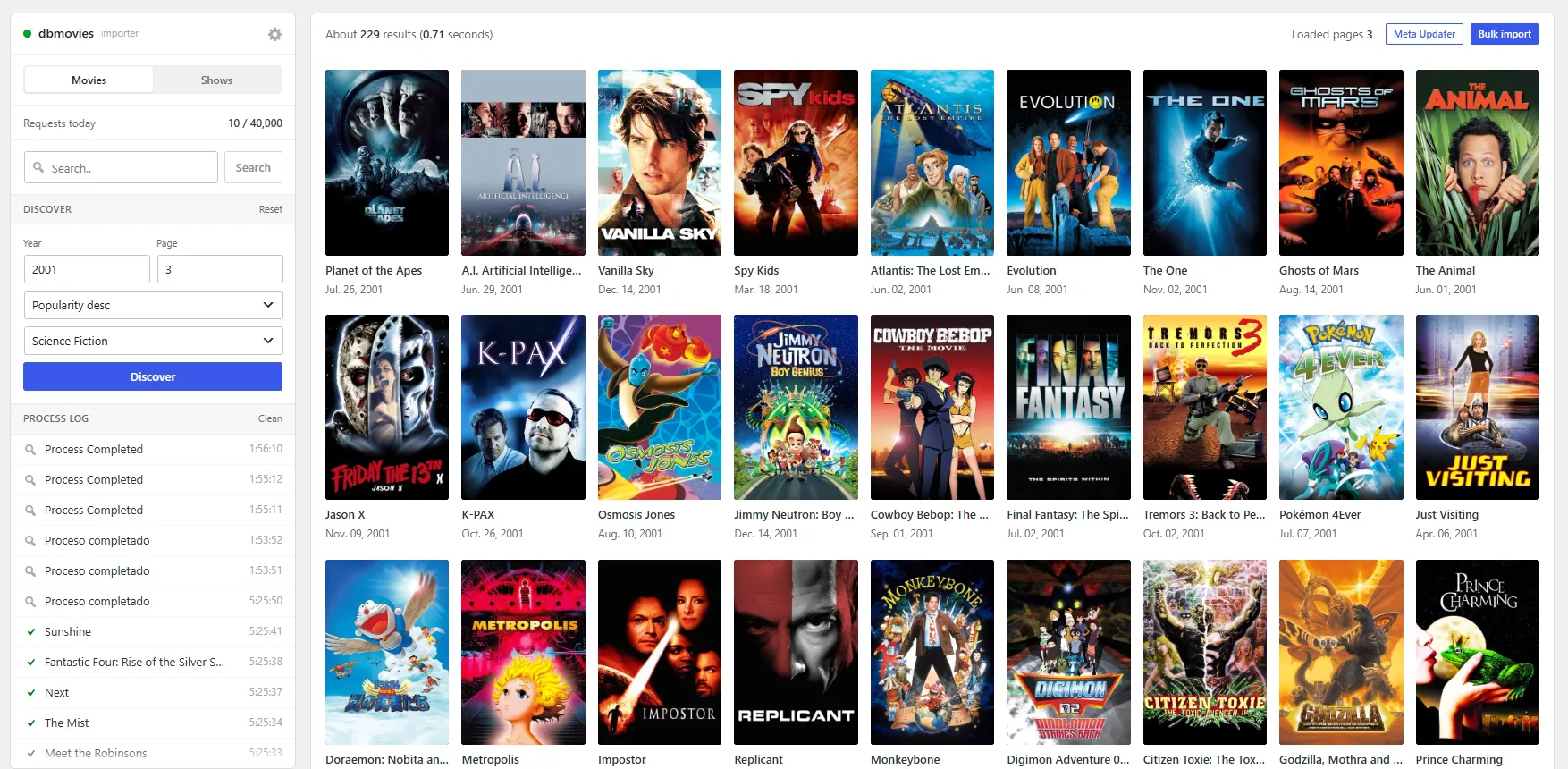
Build your catalog in minutes, not months. Dbmovies, the built-in import tool, pulls titles from a trusted metadata source with a single click: synopsis, cast, directors, genres, ratings, posters and backdrops, in the language you choose. Movies, TV shows, seasons and episodes are separate content types that stay linked to each other, so a series behaves like a series and not like a pile of posts.
Fill the player automatically. With Auto Embed you set up your video servers once, using a title's IMDb or TMDb id as a placeholder in the address. Every title you import is served with its player options already in place — and when you change a server, the change applies across your whole catalog at once, with nothing to re-import.
Give your visitors a reason to come back. Registered users keep their own favorites and watched lists, rate what they see, and can submit the titles they want added. Links can be organized by type — streaming, download, torrent or purchase — with quality and language on each one.
Control every detail without writing code. Eighteen settings sections cover the home layout, sliders, featured content, the player, comments, email, advertising and SEO, with structured data so search engines read your titles as titles.
Built to stay fast as it grows. A persistent cache keeps repeated work off the database, and version 2.5.7 cuts the queries a title page needs from around thirty to one. User lists are stored in a dedicated indexed table, so a library of ten thousand titles answers as quickly as one of ten. Updates install from your dashboard, with the release notes right there.
Ships in five languages — English, Spanish, French, German and Turkish — with translation files included so you can add your own.
DooPlay features
A thousand titles, one click each
Search a title, press import. Synopsis, cast, directors, genres, ratings, runtime, posters and backdrops arrive already in place, in the language you pick.
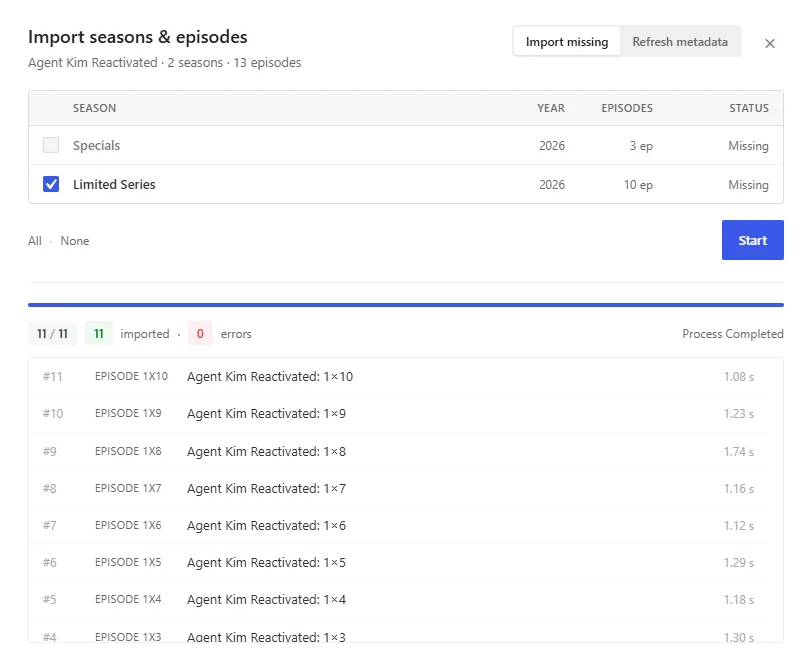
Movies, TV shows, seasons and episodes are real, separate content types that stay linked to one another — so a series behaves like a series, and an episode knows which season it belongs to. Add a show and generate its full season and episode structure in one pass.
The player fills itself
Set up your video servers once. Write the address with a placeholder where the title's id goes, and every title you import is served with its player options already there.
Change a server later and the change reaches your entire catalog at once. Nothing to re-import, nothing to edit title by title.
Every source, organized
Streaming, download, torrent or purchase — each link carries its own quality and language, and visitors see them grouped and labeled instead of dumped in a list.
The player takes multiple sources per title, shows a flag for each language, and your users can report a broken one without leaving the page.
Visitors who come back
Registered users build their own favorites and watched lists, rate what they see, and request the titles they want you to add next — so your roadmap comes from your audience instead of your guesses.
Eighteen panels, zero code
Home layout, sliders, featured rows, player behavior, comments, email, advertising and SEO, all from a settings screen. Structured data ships built in, so search engines read your titles as titles — with their ratings, cast and release dates.
Fast at ten titles. Fast at ten thousand.
A persistent cache keeps repeated work off your database. In 2.5.7 a title page went from around thirty database queries to one, and user lists moved to a dedicated indexed table — so a library of ten thousand titles answers as quickly as a library of ten.
Updates that take one click
New versions appear in your dashboard with the release notes attached. Read what changed, press update, done.
DooPlay requirements
Server
- PHP 8.1 or higher. Tested through PHP 8.3.9, with no deprecation notices.
- WordPress 6.0 or higher, on a standard installation.
- MySQL 5.6+ or MariaDB 10.1+, with InnoDB available. DooPlay creates one table of its own for user lists.
- 128 MB of PHP memory as a working minimum. Importing titles downloads and resizes artwork, so 256 MB makes bulk imports comfortable.
PHP extensions
json,mbstringandcurl— all three ship enabled with virtually every host.- An image library, GD or Imagick, so WordPress can generate poster and backdrop sizes.
Permissions
- Write access to
wp-content/uploadsfor artwork, and towp-content/cachefor the persistent cache. - Permission to create one table in your database, done automatically on install. If your host doesn't allow it, DooPlay keeps working without it.
Outbound connections
Your server needs to reach:
- The metadata service, for importing titles and artwork.
- The Doothemes license server, for activation and updates.
Both over HTTPS on port 443. Hosts that block outbound requests will prevent imports and updates from working.
License
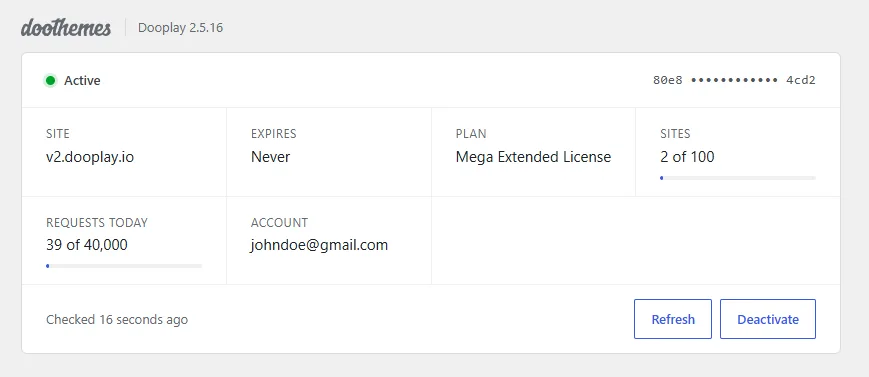
One license activates one domain. Moving to a different domain takes a minute — deactivate on the old one, activate on the new — and does not affect your content.
What's new in DooPlay
v2.5.28 Oct 19, 2026
This update fixes two small issues. Sites that create episodes by hand with a TMDb ID that is not a number should install it.
Fixes
- A new episode did not appear on its season page for up to 48 hours when the series used a TMDb ID with letters, spaces or accents. It now appears as soon as the episode is saved.
- The WordPress login screen showed a PHP warning when no custom login logo was set.
v2.5.27 Oct 03, 2026
This hotfix brings back the duplicate check when you import from the Add New screen. Get data on an entry that was already imported still refreshes it.
Fixes
- Importing a movie, TV show, season or episode with Get data from its Add New screen created a duplicate when the entry already existed, with no warning, even with Allow repeated content turned off. The warning now appears and nothing is imported.
v2.5.26 Oct 01, 2026
This hotfix brings back the Load more button on the account page and on public profiles. No saved titles were lost: they were only hidden.
Fixes
- Users with more than 18 titles in Favorites or Seen could not load the rest on their account page or on their public profile: the Load more button did not appear.
- The Favorites and Seen totals on those pages showed the wrong number.
After updating
- If your child theme has its own copy of the account page or the public profile template, replace it with the new version from the theme: old copies do not get the fix.
v2.5.25 Sep 23, 2026
This release makes the view counter lighter on the server and closes several security issues. Updating is a priority for every site, especially sites that use the player page for MP4 sources.
Important changes
- With User register enable turned off (the default), visitors can no longer create an account from the Account page. Before, the setting only hid the Sign Up link.
- Search engines and other bots no longer add views, so view counts grow more slowly than before.
- With reCAPTCHA v3 keys set, sign-up and the contact form now reject visitors with a low score.
Improvements
- The Ajax view counter answers faster and no longer loads the admin area on every visit.
- The first visit to a title no longer clears the object cache (Redis, Memcached) for the whole site.
- Title pages no longer reload all their data from the database after each view.
- The Ajax view counter only counts published titles, and only when View count is set to Ajax.
Fixes
- A crafted link to the player page could run scripts on the site.
- Anyone could see the pending and deleted links of a user on their public profile.
- Another website could sign visitors out of the site.
- With the wp-json delivery method, iframe sources were not cleaned, and some requests returned a server error.
- Google Drive share links ending in
/viewwere not read correctly. - Genre names with parentheses broke the genre list.
After updating
- If visitors should be able to create accounts, turn on User register enable in Settings › General.
v2.5.24 Aug 26, 2026
Latest version of the line 2.5, next major version 2.6
- CHANGE: The cache folder for seasons and episodes moves out of the theme, to
wp-content/uploads/dooplay/. It is created automatically, nothing to do by hand, and theme updates no longer delete it. - CHANGE: Managing links now requires a valid security token. Updating is a priority for every site.
- NEW: Movie Info and TV Show Info now open with a section that shows whether the entry is linked to a title, and what to do about it.
- NEW: Typing an ID that another entry already uses shows a warning with its name and a link to it.
- NEW: The button that opens the season importer is now part of the metabox, so it also works with the block editor turned off.
- IMPROVE: Series and movie pages show the linked ID, a link to its page on the source site, and when its metadata was last updated.
- IMPROVE: The metadata and season import buttons are now on the entry itself, instead of only on the list screens.
- IMPROVE: Season and episode lists load from cache again, which removes several database queries per season on every series page.
- FIX: Season dates on series pages showed their formatting tags as plain text.
- FIX: A series with a single season read "1 seasons".
- FIX: The Update metadata button appeared on sites where that content type was disabled in the updater settings, where it could not work.
- FIX: Saving an entry, the daily cleanup and the Delete cache button no longer raise a PHP warning when the cache folder is missing.
v2.5.23 Aug 25, 2026
- CHANGE: Link management now requires permission to edit the entry the link belongs to. Updating is a priority for every site.
- CHANGE: Metabox titles in the block editor go back to the standard WordPress size.
- CHANGE: Clicking a row in the link list no longer highlights it.
- NEW: The season status in Episoder is now a button that opens that season for editing, where its episodes are listed as well.
- NEW: The episode count in Episoder opens the list of episodes already in the library, each one linking to its own entry.
- IMPROVE: The Episoder window uses the full height of the screen.
- IMPROVE: The Video Player metabox has been redesigned, with numbered rows, a wider field for the source and a clearer control to remove a row.
- IMPROVE: Player rows renumber themselves when reordered, added or removed.
- IMPROVE: The Links metabox now matches the Video Player metabox, and its inline editor has labeled fields with Delete separated from Save.
- IMPROVE: Link lists load with far fewer database queries on entries with many links.
- FIX: A player row with a source but no title was discarded when saving, without warning.
- FIX: Player sources and link fields are validated and cleaned before being saved.
- FIX: Opening the link editor no longer loses a language or quality value that is no longer listed in the theme settings.
v2.5.22 Aug 24, 2026
- NEW: IMDb ID and TMDb ID columns return to the Movies and TV Shows lists, each one linked to the title page on IMDb and TMDb. Both are hidden by default, enable them from Screen Options.
- NEW: Ctrl + M updates every title on the current page of Movies or TV Shows, four at a time, with a confirmation before it starts and a progress bar while it runs.
- NEW: The Featured column can now be sorted, and a Featured link above the list shows how many there are and filters the list down to them.
- NEW: When a quick import URL belongs to a title already in the database, the notice links straight to it instead of only reporting the duplicate.
- NEW: An interrupted bulk update is now reported on the Dbmovies screen, with a counter on the Metaupdater button, so there is no need to open the tool to find out that one was left unfinished.
- CHANGE: The IMDb and Rating columns are now called IMDb ratings and User ratings.
- CHANGE: The Tags column is hidden by default on Movies and TV Shows. Screen Options brings it back.
- IMPROVE: Column headers no longer break into two lines, and the sorting arrows stay next to the title instead of dropping below it.
- IMPROVE: The Spanish translation covers every new text in the admin.
- FIX: Discarding an unfinished bulk update left the counter on the Metaupdater button until the page was reloaded.
v2.5.21 Aug 23, 2026
- CHANGE: The popular content widget refreshes every few minutes instead of being recalculated on every page view. The ranking itself is unchanged.
- IMPROVE: The most viewed ranking is cached instead of being sorted from scratch on every visit. On a large catalog this was by far the most expensive query on the site.
- IMPROVE: Similar titles and random listings still change between visits, but the selection comes from a cached group rather than a fresh database sort every time.
- IMPROVE: When a genre carousel list expires, one visitor refreshes it while everyone else keeps seeing the previous list.
- IMPROVE: Listings ordered by date are left uncached on purpose, so a newly published title still appears immediately.
- IMPROVE: Clearing the cache from the toolbar now also clears these listings on sites running Redis or Memcached.
- FIX: The importer search listed TV shows under their original title instead of the title in the configured language, so searching for an English title reported one result and appeared to display nothing.
v2.5.20 Aug 21, 2026
- CHANGE: Share buttons encode the page address and the title inside the link.
- CHANGE: Link addresses are checked against a list of supported schemes before being rendered. Torrent links using
magnet:keep working exactly as before. - IMPROVE: Values shown inside links, images, form fields and page text are escaped consistently across the whole theme, in the public pages and in the dashboard alike.
- IMPROVE: The translation catalog covers 1607 strings, including the DooPlay Status screen, which had never been listed. Spanish is complete.
- IMPROVE: Player sources, language flags, favicons and genre lists build their addresses correctly when a value contains a character that has to be encoded.
- FIX: Titles containing a colon or an apostrophe are now shared correctly.
- FIX: Ratings, episode names, season numbers, languages, qualities and file sizes display correctly when they contain characters such as
&,<or a quotation mark. - FIX: The user name and biography shown on the public author page display correctly regardless of what they contain.
- FIX: Counters across the account page, the author page and the link tables always render as numbers.
v2.5.19 Aug 21, 2026
- IMPORTANT: Priority update, recommended for every site. This release hardens how the theme handles values that come from a form, a link or the page address. We recommend installing it at your earliest convenience.
- CHANGE: Link addresses are validated against a list of supported schemes before being rendered. Torrent links using
magnet:keep working exactly as before. A link stored with an address the theme does not support now renders with an empty destination. - CHANGE: Share buttons send the page address encoded inside the link.
- IMPROVE: Values shown inside links, images and form fields are escaped consistently across the theme, in both the public pages and the dashboard.
- IMPROVE: Permalink slug settings are restricted to administrators and require a valid form submission.
- FIX: Titles containing a colon or an apostrophe are now shared correctly.
- FIX: The sign up form no longer loses what was typed when the page reloads without JavaScript.
- FIX: Player language flags, favicons, share links and the genre lists build their addresses correctly when a value contains a character that has to be encoded.
v2.5.18 Aug 20, 2026
- NEW: Status screen at Appearance › DooPlay Status, with twelve checks on your installation: PHP version, license, database, links module and each of the seven required pages.
- NEW: The required pages are watched. If one is deleted, sent to the trash, left as a draft or loses its DooPlay template, the status screen says so. Until now nothing did, and the matching link in the header quietly led to a missing page.
- NEW: Four helpers for reading user ratings from your own templates:
doo_rating_average(),doo_rating_votes(),doo_rating_has()anddoo_rating_box(). - IMPROVE: Tested on WordPress 7.1. Every front page and admin screen was verified on it, and the theme now declares which version it was checked against.
- IMPROVE: The theme no longer produces any deprecation warning on PHP 8. The last one appeared on every admin page load.
- IMPROVE: The rating block on film, show and season pages is built directly instead of going through the shortcode parser on every page view.
- IMPROVE: The ratings module no longer registers hooks left over from the plugin it came from, including integrations with three products DooPlay does not use.
- FIX: A leftover function in the ratings module called code that does not exist. It was never reached, but it would have stopped a page from loading for anyone who hooked it up.
v2.5.17 Aug 18, 2026
- CHANGE: Template parts that a child theme had copied but that were previously ignored now take effect. If you copied one of these files into your child theme and it never seemed to do anything, it will start working after this update. Review those copies before updating a busy site.
- NEW: Child themes can replace every front-end template part: the link countdown page, the login form, the episode navigator, the player and links editors, the comment scripts and the player library. Copy the file keeping the same path and your version is used.
- IMPROVE: The TOP IMDb block makes roughly half the database queries it used to. Its cache was making it slower than having no cache at all.
- IMPROVE: The home page modules no longer rebuild the page's main query once per module, and no longer ask the database to count the whole catalogue on every load.
- IMPROVE: Each genre carousel stores about a hundred times less data in the options table.
- IMPROVE: Changing the TOP IMDb settings now takes effect on the next page load instead of up to an hour later.
- IMPROVE: The player page no longer stops loading if the player setting holds an unexpected value.
- FIX: The home page could stop loading halfway through if a genre used by one of its carousels had been deleted. Everything below that point disappeared.
- FIX: The Popular content widget left out most of the catalogue. With Visits, which is the default, it showed 13 titles out of 27.
- FIX: The Popular content widget did not remember Likes. Reopening it showed Visits again.
- FIX: The Related content widget listed the title the visitor was already reading, every time.
- FIX: The TOP IMDb ranking reshuffled titles that share the same score whenever a title was imported or edited, so the list appeared to change order on its own.
- FIX: Two genre carousels for the same genre shared one cache, so the second one showed the first one's titles.
- FIX: A genre carousel without a title left broken markup on the home page.
- FIX: The Featured titles block could stop the page from loading when the release year taxonomy was not available.
- FIX: A public user profile showed no name at all.
- FIX: The comment counter above the comment list stayed in English in every language.
- FIX: The copyright year in the footer could be wrong on the last day of the year for sites ahead of UTC.
- FIX: The banner and header code screen could be saved without administrator permission. That screen writes code that runs on every page of the site.
- FIX: Theme notices about the license, the database and the required pages were shown to any logged-in user, including subscribers, with a link they could not use.
- FIX: The sidebar content widget showed nothing until it was configured, instead of using its own defaults.
v2.5.16 Aug 16, 2026
- CHANGE: The
doo_postmeta_episodesfilter now runs. Episodes were previously passed to the seasons filter by mistake, so anything hooked to the seasons filter also received episode data and anything hooked to the episodes filter was never called. Child themes relying on the old behaviour must move their code to the right filter. - CHANGE: The admin notices that offer to generate the required pages or update the database now carry a security token. Old bookmarked links to those actions no longer work — use the notice.
- CHANGE: Deleting a user rating now requires an administrator. It was previously available to anyone.
- NEW: Importer settings — a gear in the importer sidebar opens eleven preferences: infinite scrolling and how many pages before it stops, a confirmation before a bulk import, how many failures in a row stop a run, a notice when a run finishes, hiding titles already in your library, poster size, and four options for the process log.
- NEW: The importer process log survives a reload. It is kept for as many lines and days as you choose, instead of disappearing every time the screen reloads.
- NEW: Discover remembers your choices. Every field except Page is kept, and a Reset link appears when anything differs from the defaults.
- NEW: The results header stays in place. Progress and the run buttons remain reachable while the log grows, instead of scrolling out of view.
- IMPROVE: The progress bar only shows while an import is running.
- IMPROVE: The importer settings window always fits on screen, and its scrollbar only appears when the pointer is over it.
- FIX: Ratings could be manipulated from outside the site. A visitor without an account could send values that pushed a title's score down to zero, create unlimited rows in the options table, or remove other people's votes.
- FIX: A logged-in user could change the status of any post on the site, including sending an administrator's content to the trash, and could create published pages in bulk.
- FIX: A visitor without an account could mark posts as featured.
- FIX: After a correct login, the site could be made to send the visitor to an external address chosen by whoever prepared the form.
- FIX: The links tables could be made to return content they should not, by tampering with the request.
- FIX: Registration reported success even when the account had not been created, and sending the form without a password created an account that could never sign in.
- FIX: Deleting the last rating of a title, or opening a title that had no ratings, could stop the page from loading.
- FIX: Episode navigation could stop the page from loading on the first episode of a season.
- FIX: In the database tool, running a process from a page that had been left open for too long wiped the record of every process ever run, and reported success anyway.
v2.5.15 Aug 14, 2026
Finishes the per-title update in the movie and TV show lists, and fixes an import that could leave the screen stuck when the connection dropped. No manual steps after updating.
- CHANGE: The importer sidebar drops the back-to-top button and the themoviedb.org logo.
- NEW: Refreshing a single title from the movie or TV show list now fills in its IMDb, Rating and Views columns on the spot. Before, you had to reload the page to see the new values.
- NEW: A clear button empties the search box in the importer sidebar in one click.
- IMPROVE: The Update button in the lists shows a spinner while it works and a check mark when it finishes, so it is clear which rows are still running. It stays locked for a few seconds afterwards to avoid spending credits on the same title twice.
- IMPROVE: Search and Discover no longer read as one form. Search stays disabled until you type at least two characters, and Discover no longer fills the year with a random one — it starts empty.
- IMPROVE: The results grid shows its shape while the first page loads, so the screen no longer jumps when titles arrive.
- IMPROVE: The Load More button is wider and easier to find.
- IMPROVE: Dbmovies has its own icon in the admin menu.
- FIX: If the connection dropped during an import, the process log could mark a title that had been imported correctly as failed.
- FIX: An import interrupted by a connection problem left the screen loading forever, with the buttons no longer responding. It now reports the failure and the screen goes back to normal.
v2.5.14 Aug 13, 2026
The import screen is rebuilt from the ground up, and importing finally tells you what it is doing while it does it. This version also raises the minimum WordPress and PHP the theme runs on, so check your server before updating.
- CHANGE: DooPlay now requires WordPress 7.0 and PHP 8.1. A site below either one will not be able to activate the theme.
- NEW: Redesigned import screen. Search, filters, the metadata updater and the process log move into a sidebar that stays in place while you scroll through results.
- NEW: Import progress. Bulk import shows how many titles are done, how many failed, an estimate of the time left, and a button to stop a run without leaving the page.
- NEW: Edit from the grid. Titles already in your library show an Edit button over the poster, and it opens that title ready to edit.
- NEW: Endless results. The next page loads as you reach the bottom, and the Load More button is still there.
- IMPROVE: Posters are all the same size, whatever proportion themoviedb.org serves them in.
- IMPROVE: Titles already in your library are unmistakable at a glance, and say so in words.
- IMPROVE: The process log reads as one line per title, with its status, its time and a link to edit it.
- IMPROVE: The grid adapts to the real width of the screen, including when you collapse the admin menu.
- IMPROVE: The import screen credits themoviedb.org with its logo.
- FIX: Bulk import reported every successful import as failed.
- FIX: Endless scrolling either never loaded the next page or loaded several at once, depending on how tall the results were.
- FIX: The Edit link in the process log could not be clicked.
- FIX: A failed import looked like any other line in the process log.
- FIX: The Start button of the Meta Updater could disappear on sites upgraded from older versions.
- FIX: Theme files could stay cached in the browser after an update, leaving parts of the screen running the previous version.
v2.5.13 Aug 12, 2026
A hotfix for the season and episode importer introduced in 2.5.12. Series whose episodes are numbered continuously across the whole show failed to import, and updating is recommended for every site running 2.5.12.
- FIX: Importing a series whose episodes are numbered continuously across the whole show, instead of restarting at 1 in every season, failed on every episode with a "resource not found" message — the importer now reads the real episode numbers from themoviedb.org instead of assuming they start at 1.
- FIX: The same problem affected the specials of many otherwise ordinary series, where a few episodes were requested that did not exist.
- FIX: Refreshing the metadata of a season requested episodes that did not exist, for the same reason.
v2.5.12 Aug 12, 2026
A major release for the Dbmovies module. Importing seasons and episodes was rebuilt into a single window, the admin lists gained sorting and two new columns, and series pages load far fewer database queries. It also fixes a problem that could hide the episodes of a series that had them, and one that could create empty titles when themoviedb.org was unreachable.
- CHANGE: Importing movies, seasons and episodes now requires an active theme license, the same way importing a series already did — the metadata updater requires one too.
- CHANGE: The season list was removed from the series editor. The editor toolbar has a
Get seasonsbutton instead, which opens the import window. - NEW: Seasons and episodes are imported from a single window that runs on its own, with a progress bar and a log — it opens from the series list, the seasons list, the season editor and the series editor toolbar, and always shows the same thing.
- NEW: An unfinished import can be resumed. Closing the tab in the middle of a run no longer loses it; the window offers to pick it up where it stopped.
- NEW: The same window can request the metadata of seasons and episodes again, refreshing them without creating anything new.
- NEW: Movie and series lists show an IMDb column with the rating and its number of votes.
- NEW: A Metaupdater column adds an
Updatebutton on each row, to refresh that single title without opening the meta updater. - NEW: All four content lists can be sorted by rating and by views. Titles without a rating still appear in the list.
- IMPROVE: Series pages load much faster — a series with 177 episodes went from 721 database queries to 10, and the number no longer grows with the size of the series.
- IMPROVE: Episode images on series and season pages now load as you scroll, instead of all at once.
- IMPROVE: When importing seasons and episodes, themoviedb.org is contacted by your server instead of by the browser, and the number of seasons is read from that answer rather than taken from the page.
- IMPROVE: The Spanish translation is complete, and the License, Auto Embed and importer screens can now be translated into any language.
- IMPROVE: After updating, the admin screens no longer need a browser cache refresh to look right.
- FIX: A series could show no episodes at all even though its episodes were imported — this repairs itself the next time the page is visited, with nothing to do by hand.
- FIX: Specials could never be imported. Season 0 was treated as an empty value and rejected before reaching themoviedb.org.
- FIX: If themoviedb.org could not be reached while importing, empty seasons and episodes were created and published. Nothing is created now, and the message says the resource is unavailable instead of blaming the title.
- FIX: An error from themoviedb.org, such as a blocked key or an exhausted quota, was reported as a successful import.
- FIX: The
Get databutton in the editor did not refresh anything for movies, series, seasons or episodes unless theRepeatedsetting was on. - FIX: Episode titles in the import window could show a raw HTML code where the
xbetween the season and the episode number should be.
v2.5.11 Aug 12, 2026
A follow-up to 2.5.10. It fixes two visible problems in the new metadata updater, adds a way to skip titles that were refreshed recently, and fixes a settings problem that has been there far longer.
- ADD: A new
Skip recently updatedsetting leaves out of the run any title refreshed less than the given number of days ago, so running the tool again is far cheaper than the first time — it is off by default, and the tool reports how many titles it left out. - IMPROVE: The metadata updater now waits between titles, using the same
Delay timesetting the importer already respected, so refreshing a large catalog no longer sends a continuous stream of requests to themoviedb.org — and the estimated time accounts for the wait. - FIX: Settings that come enabled could not be turned off: unchecking a box and saving appeared to work, but the setting came back on the next admin page load. This affected thirteen of the eighteen checkboxes in Dbmovies settings, so if you turned any of them off in the past, set them again.
- FIX: The metadata updater window did not return to its normal state after stopping a run — the progress bar, the counters and the list stayed on screen.
- FIX: The
Start,PauseandStopbuttons were all visible at the same time while a run was in progress. - FIX: Stopping a run while a title was still being processed could put its result back on screen after the window had already been cleared.
v2.5.10 Aug 11, 2026
This release rebuilds the metadata updater, brings the options framework in-house together with a group of security fixes, and adds an hourly installation report. Updating is recommended for every site.
- IMPORTANT: The theme now reports its installation to Doothemes once an hour — it sends the product identifier, the site domain, the administrator email address and the server IP address, and nothing about your content or your visitors; the full description is in the
readme.txtfile included in the package. - IMPORTANT: The metadata updater moved out of the panel header into its own window, and the content types to refresh are now chosen there instead of in the settings screen.
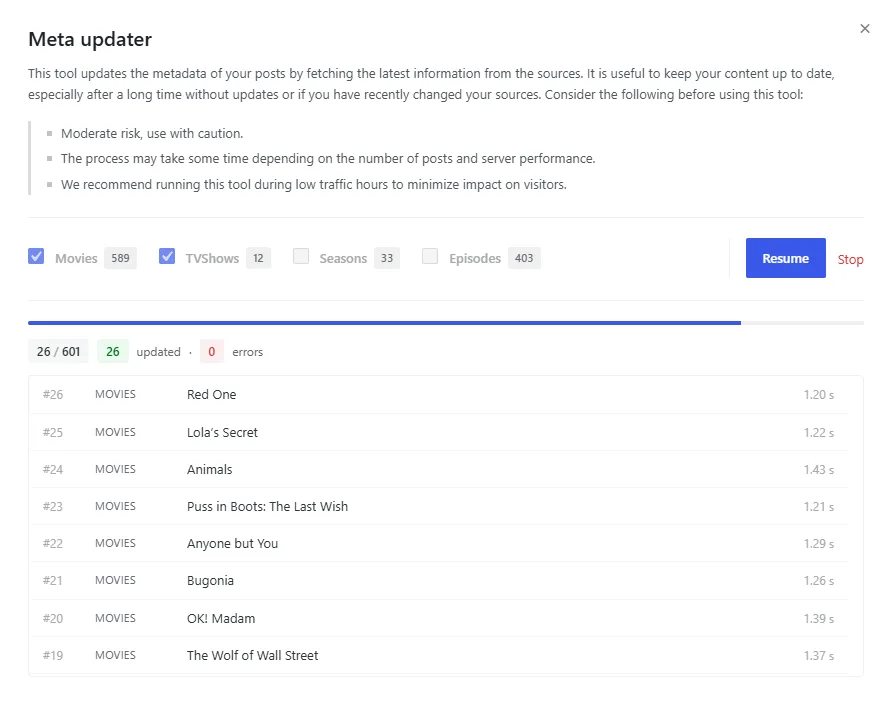
- ADD: The metadata updater shows how many posts each content type has before you start, and while it runs it reports progress, how many succeeded and failed, the estimated time left, and every post it touches with the time it took and a link to edit it.
- ADD: A run can be paused, resumed and stopped, and it survives closing the browser tab — reopening the tool offers to continue where it stopped, keeping everything already processed.
- ADD: The package now includes a
readme.txtdescribing the product, its requirements and exactly what the theme sends over the network. - IMPROVE: Pages load lighter — the options framework was loading 77 files on every visit to the public site for a panel that only exists in the WordPress admin.
- IMPROVE: The admin panel is translated into more languages, and it now uses the same translation files as the rest of the theme, so translating DooPlay no longer means maintaining a second catalog that updates overwrite.
- IMPROVE: The metadata updater progress bar follows your admin color scheme.
- FIX: Several actions in the options framework ran without checking user permissions, and could reach settings that did not belong to the theme.
- FIX: The metadata updater could skip titles — it re-queried the catalog between every post, so a post changing status during a run shifted the rest of the list.
- FIX: The metadata updater could be started by any user allowed to edit posts, spending your themoviedb.org quota and your license credits.
- FIX: Three settings kept loading on every visit to the site long after the tool that created them had finished.
- FIX: The metadata updater settings no longer offer a
Methodoption that did nothing, and itsLearn morelink, which pointed to a page that no longer exists, was removed. - FIX: A warning could appear during update checks when the response from WordPress.org did not include the expected data.
v2.5.9 Aug 10, 2026
A security and maintenance release for the Dbmovies module. Several admin actions could be reached by any registered user, and a number of errors that showed up while managing content are fixed. Updating is recommended for every site.
- CHANGE: Admin actions now check user permissions before running — the importer, the metadata updater and the requests moderation are limited to users who can edit content.
- CHANGE: The dashboard inbox widget is now shown only to users who can edit content, instead of to every logged in user.
- IMPROVE: Front-end pages load less code, since the module no longer loads its admin classes on visits to the site.
- IMPROVE: The Dbmovies styles and scripts load only on the screens that use them, instead of on every admin page.
- IMPROVE: The contact and report forms, and the metadata updater, run lighter database queries than before.
- FIX: Regenerating a title from the editor now updates its data — before it added a second copy of every field and kept showing the old values.
- FIX: Seasons and episodes without an air date no longer show today's date as the release date.
- FIX: The metadata updater no longer fails on sites with no published movies.
- FIX: The content template set in Settings is now applied to imported titles on new installations.
- FIX: Settings that accept a number can now be set to zero, instead of falling back to the default value.
- FIX: The featured image is taken from the title being saved, so it is no longer skipped during quick edits.
- FIX: Fields that contain HTML, such as the content template, no longer break the Settings form.
- FIX: The gallery on a title page no longer breaks when the title contains a quote.
- FIX: Random backdrops are now really random — one in every few page loads always showed the first image.
- FIX: The importer reports a clear message when the theme license is not active, instead of an empty error.
- FIX: The Dbmovies panel no longer links to a retired service.
v2.5.8 Aug 9, 2026
A maintenance release. It fixes an issue that could leave user lists looking empty right after updating, and clears the PHP notices that were filling error logs on sites running PHP 8.
- FIX: Favorites and watched lists could appear empty right after updating, while the data was still moving to its new storage.
- FIX: The error log no longer fills with PHP notices — sites on PHP 8 were getting dozens on every admin page load.
- FIX: WordPress no longer reports that translations are loaded too early, a notice introduced in WordPress 6.7.
- IMPROVE: Existing lists move to their new storage in larger batches, finishing in fewer visits to the admin on large catalogs.
v2.5.7 Aug 3, 2026
Auto Embed arrives: set up your video servers once and every title you import is served with its player options already in place. This release also cuts a large part of the database work behind title pages and user lists, so the site keeps its speed as the catalog grows.
- ADD: Auto Embed — set up your video servers once and every imported title is served with its player options already filled in.
- ADD: Placeholders for movies and episodes, using the title's IMDb or TMDb id, season and episode number.
- ADD: Database cleanup tool that removes the old copy of the favorites data and tells you how many rows it will delete.
- CHANGE: Your list is now sorted by when each title was added, newest first, instead of by release date.
- IMPROVE: Title pages load with far fewer database queries — deciding which link tabs to show took around thirty and now takes one.
- IMPROVE: Favorites and watched lists no longer scan the whole metadata table, so the account page stays fast as the catalog grows.
- IMPROVE: Player sources are built when the page is served instead of being copied into every title, so changing a server applies everywhere at once.
- FIX: View counts no longer lose visits when several people open the same title at the same time.
- FIX: Link tabs no longer appear when the tab would be empty.
- FIX: Reset User favorites and Reset User views now really clear every list, instead of reporting success while leaving them in place.
v2.5.6 Aug 3, 2026
The licensing system is rebuilt. The theme and Dbmovies now share a single license, activation happens in the WordPress admin, and updates install from your Dashboard. Coming from an earlier version, you will need to enter your license key once after updating.
- IMPORTANT: Licenses from earlier versions are not carried over — enter your key once in Appearance › Licenses after updating.
- IMPORTANT: The license is now tied to a domain, so deactivate it before moving your site to a different one.
- CHANGE: Dbmovies no longer has its own API key — the theme license enables importing and IMDb data, and the old key is removed automatically.
- CHANGE: The Dbmovies screen now requires an active license and redirects to the license page instead of failing on the first import.
- ADD: License page showing your license status, the domain it is activated on, your daily request usage and the expiration date.
- ADD: Automatic updates — new versions appear in your Dashboard and install from there, with no manual download.
- ADD: Release notes for each version, opened from the update details link.
- IMPROVE: Title metadata and images load directly from TMDb instead of going through an intermediate server.
- IMPROVE: The import screen shows how many requests are left on your license while importing.
- IMPROVE: IMDb ratings, certification and country are requested with the title type, so movies and shows sharing an identifier are no longer mixed up.
DooPlay frequently asked questions
No. DooPlay is the software that runs your site — the catalog, the player, the user accounts. It does not include, host or provide any video content, and it does not come with video servers configured. What you publish and where you get it from is your responsibility.
Metadata and artwork: titles, synopsis, cast, directors, genres, ratings, runtime, release dates, posters and backdrops. The information you'd otherwise type by hand for every title.
No. Everything is configured from the WordPress settings screen. Knowing your way around WordPress helps, but you never have to open a file.
Yes. It installs like any theme. Your existing posts and pages stay where they are — DooPlay adds its own content types for movies and shows alongside them.
Yes, and you should use a child theme for it, as with any WordPress theme. That way your changes survive updates.
You can activate all the sites that your license allows; each tier has its own limitations.
Yes. Deactivate the license on the old domain and activate it on the new one. It takes a minute and doesn't touch your content. Development and staging domains follow the same rule, so deactivate before you tear one down.
Your site keeps working and your content stays intact. What stops is access to updates and to the metadata service, which is what powers importing.
Yes. New versions show up in your WordPress dashboard with the release notes attached — read what changed, press update.
Two ways, and you can combine them. Add links by hand to any title, organized by type — streaming, download, torrent or purchase — each with its quality and language. Or set up Auto Embed once and let every imported title arrive with its player options already filled in.
You give DooPlay the address format your video server uses, with a placeholder where the title's id goes. From then on, every title you import serves that source automatically. Change the server later and it applies to your whole catalog at once, with nothing to re-import.
Yes. Registered users keep their own favorites and watched lists, rate titles, and can request the ones they want added.
DooPlay outputs structured data, so search engines read your titles as titles — with their ratings, cast and release dates — rather than as generic posts.
It ships in English, Spanish, French, German and Turkish, and includes the translation files to add any other language.
Yes, provided your host allows outbound HTTPS connections — that's what importing and updates need. Some very restrictive hosts block them.
Large catalogs are the normal case. Version 2.5.7 specifically reduced the database work per page: a title page went from around thirty queries to one, and user lists moved to a dedicated indexed table so they don't slow down as the library grows.
DooPlay has its own persistent cache for the heavy work and doesn't conflict with page caching. If you use one, exclude the account pages and any logged-in view, as you would with any site that has user accounts.
PHP 8.1 or higher. It runs clean on PHP 8.3.9 with no deprecation notices.