Dbmovies
Import links
A practical guide to importing thousands of links from a spreadsheet: how to build the file, every value each column accepts, ready-to-copy examples, what each message of the review means and how to fix it, and the best order for a large catalog.
Overview
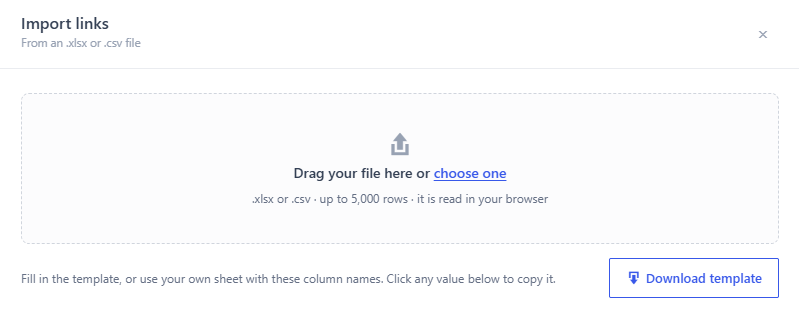
Import links adds thousands of links at once from a spreadsheet. You open it in Dbmovies › Links, with the arrow next to Add link. The four steps of the panel are explained in Link sources.
This guide goes deeper:
- how to build a file that imports at the first try;
- every value each column accepts;
- examples you can copy;
- what each message of the review means and how to fix it.
Before you start
- The titles must be on your site and published. The import adds links to titles you already have; it does not create titles. Import them first with the importer.
- For TV shows, the episodes must exist too. Import them with Automatic episodes or from the seasons manager.
- Each URL is added once. If a URL is already on your site, its row is skipped.
The file
| Format | .xlsx or .csv |
| Size | Up to 5,000 rows and 10 MB. Split larger files |
| Sheet | Only the first sheet is read |
| Column names | In the first row. Upper or lower case and spaces do not matter: TMDb ID is tmdb_id. You can also write tmdb, imdb, lang or link |
| Other columns | Ignored. You can keep columns for your own notes |
| Empty rows | Ignored |
Click Download template in the panel to start from a file with the right columns. Its Help sheet lists examples and every accepted value. Keep the Links sheet first: it is the one that is read.
Hyperlinks: if a cell of url shows a text such as Watch here, with the link behind it, the link is what counts.
CSV files:
- Separator: commas, semicolons and tabs are recognized on their own. Excel in Spanish saves CSV files with semicolons, and they work.
- Encoding: save the file as UTF-8. In Excel, choose CSV UTF-8 when you save. In another encoding, accents break, and a language written by name, such as Español MX, is not recognized. Codes such as
es-MXalways work.
The file is read in your browser and never uploaded to your server. Only its rows are sent, in batches, to be checked and saved.
The columns
| Column | Required | Accepted values |
|---|---|---|
tmdb_id | One of the two | A number, such as 550 |
imdb_id | One of the two | tt and numbers, such as tt0137523. Upper or lower case |
season | Episodes only | A whole number, such as 1 |
episode | Episodes only | A whole number, such as 5 |
url | Yes | A full address, starting with https:// or http:// |
type | Yes | Embed, Embed link or iframe. Download. MP4 or MP4 link. Also 1, 2 or 3 |
language | No | A code, such as es-MX (es_MX also works), or its name as the panel shows it, such as Spanish MX. Empty: no language |
quality | No | See the table below. Empty: no quality |
status | No | Published, Pending, Processing, Refused (also Rejected) or Revoked. Also 1 to 5. Empty: Published |
premium | No | Yes: yes, y, 1, true, si, sí, x or premium. No: no, n, 0, false or empty |
filesize | No | Downloads only: free text, such as 1.5 GB |
password | No | Downloads only |
Upper or lower case does not matter in any value. Types and statuses can also be written as the panel shows them in the language of your admin.
IDs
- A row without
seasonandepisodeis a movie, and its ID is the ID of the movie. - A row with both is an episode, and its ID is the ID of the TV show, not of the episode.
- You can write both IDs, TMDb and IMDb, but they must point to the same title.
- On TMDb, movies and TV shows are numbered separately: the same number can be a movie and a different TV show. That is why the season and the episode decide which one is searched.
Quality
| Write | It becomes |
|---|---|
8K, 4320, 4320p or 8K 4320p | 8K 4320p |
4K, 2160, 2160p or 4K 2160p | 4K 2160p |
2K, 1440 or 1440p | 2K 1440p |
1080 or 1080p | HD 1080p |
720 or 720p | HD 720p |
480 or 480p | SD 480p |
360 or 360p | SD 360p |
240 or 240p | SD 240p |
File size and password
They only apply to Download links: in other types they are ignored. If you leave the size empty, Dbmovies fills it in when you analyze the health of the link, if the host reports it.
Examples
A movie with several links
| tmdb_id | url | type | language | quality |
|---|---|---|---|---|
| 550 | https://player.example.com/e/abc123 | Embed | en-US | 1080p |
| 550 | https://player.example.com/e/def456 | Embed | es-MX | 720p |
| 550 | https://files.example.com/f/ghi789 | Download | en-US | 1080p |
One row for each link. They all go to the movie with TMDb ID 550.
A whole season
| tmdb_id | season | episode | url | type | language |
|---|---|---|---|---|---|
| 1399 | 1 | 1 | https://player.example.com/e/s1e1 | Embed | en-US |
| 1399 | 1 | 2 | https://player.example.com/e/s1e2 | Embed | en-US |
| 1399 | 1 | 3 | https://player.example.com/e/s1e3 | Embed | en-US |
1399 is the TMDb ID of the TV show. Each row goes to its episode.
A download with size and password
| imdb_id | url | type | quality | filesize | password |
|---|---|---|---|---|---|
| tt0137523 | https://files.example.com/f/fightclub | Download | 1080p | 2.1 GB | movies2026 |
Links for members only
| tmdb_id | url | type | quality | premium |
|---|---|---|---|---|
| 550 | https://player.example.com/e/4k-abc | Embed | 4K | yes |
Only members with an active subscription can open it. See Subscriptions.
Links to review before they go live
| tmdb_id | url | type | status |
|---|---|---|---|
| 550 | https://player.example.com/e/new123 | Embed | Pending |
Pending links are not visible. Review them in Dbmovies › Links and publish them when they are ready.
The review, row by row
When you drop the file, nothing is saved yet. Each row gets a state:
| State | Message | What to do |
|---|---|---|
| Ready | Nothing: it will be imported | |
| Already exists | Already linked to this title. | Nothing: the link is already there |
| Already exists | Already linked to "Title". | That URL belongs to another title. The import does not move it: if it is in the wrong title, edit the existing link |
| Repeated | Same URL as row 12. | The file has that URL twice. Only the first one counts |
| Not found | No movie with TMDb ID 550. | Import the movie first, or check that the ID is of a movie and not of a TV show |
| Not found | No TV show with TMDb ID 1399. | Import the TV show first, or check that the ID is of the TV show |
| Not found | Title has no season 2 episode 5. | The TV show is on your site, but that episode is not. Import it with Automatic episodes or the seasons manager |
| Not published | "Title" is not published. | Publish the title, then upload the file again |
| Error | The URL is missing. or The URL is not valid. | Write the full address, with https:// |
| Error | The type is missing. or Unknown type "…". | Use Embed, Download or MP4 |
| Error | Add the TMDb or IMDb ID of the title. | Fill in tmdb_id or imdb_id |
| Error | The TMDb ID must be a number. or The IMDb ID must look like tt1234567. | Fix the ID |
| Error | The TMDb and IMDb IDs point to different titles. | One of the two IDs is wrong. Keep the right one |
| Error | Season and episode go together: fill in both or neither. or Season and episode must be whole numbers. | Fill in both, with numbers, or leave both empty for a movie |
| Error | Unknown status, language or quality "…". | Use one of the values of The columns |
| Error | Premium must be yes or no. | Use yes or no |
The preview shows up to 500 rows for each state. To fix the rest:
- Click Rows with problems. It downloads every row that will not be imported, with the reason in an extra column.
- Fix them in your spreadsheet.
- Upload that file again.
A large catalog
Follow this order:
- Import your titles with the importer.
- Import the episodes of your TV shows with Automatic episodes.
- Import the links, in files of up to 5,000 rows. While the import runs, keep the panel open. Stop pauses it at the end of the current batch.
- Fix the leftovers with Rows with problems and upload them again.
- Analyze their health at the end.
Uploading the same file twice is safe: the links you already imported are skipped. If an import stops halfway, upload the same file again.
After the import
- Health: imported links come in as Not checked. The last step of the panel offers Analyze health, which checks only the links you just imported, three at a time. See Link health.
- Rows not imported: downloads the rows that were not saved, with their reason.
- Your other sites: if you use Sync List to send links, every imported link is also sent to the sites of your network that accept it. A big import means many sends: they go out in the background, in batches.
Common mistakes
| Problem | Cause and fix |
|---|---|
| All the episodes say Not found | The file has the TMDb ID of each episode. Use the ID of the TV show in every row |
| A movie says No movie with TMDb ID… but you have it | The ID is of a TV show with the same number. On TMDb, movies and TV shows are numbered separately |
| Languages written by name are not recognized | The CSV is not in UTF-8. Save it as CSV UTF-8, or use codes such as es-MX |
| Missing columns: url. (or another one) | The first row of the first sheet must have the column names. Check that the Links sheet is first |
| The file has more than 5,000 rows | Split it in several files and import them one after the other |
| A link went to the wrong title | Edit or delete it in Dbmovies › Links, fix the row, and import it again |