Dbmovies
Cloudflare Turnstile
Cloudflare Turnstile protects the sign-in, sign-up, password recovery and contact forms from bots, with a security check that is usually invisible to your visitors. This page explains how to create your widget in Cloudflare, each setting, and how to test it.
Overview
Bots try to create fake accounts, guess passwords and fill your contact form with spam. Cloudflare Turnstile stops them with a security check in your forms, which most visitors pass without doing anything: no puzzles, no pictures of traffic lights.
It is free, and your domain does not need to use Cloudflare. You set it up in Dbmovies › Settings › Integrations.
How it works
- The form shows a small Turnstile box. In the background, it checks that the visitor is a person, and usually shows Success within a second or two. Now and then it asks for a click.
- When the visitor sends the form, Dbmovies asks Cloudflare whether the check is valid.
- If it is not, the form is not sent, and the visitor sees a message.
Each check works once, and only for the form it was made for. After each answer, the form gets a new one on its own.
Create your widget in Cloudflare
- Sign in to the Cloudflare dashboard, or create a free account.
- Open Turnstile and click Add widget.
- Give it a name, such as the name of your site.
- In Hostnames, add your domain, such as
your-website.com. Add also the domains of your staging or local sites if you want to test there. - In Widget Mode, choose Managed.
- Click Create and copy the Site Key and the Secret Key.
[SCREENSHOT_HERE: Cloudflare dashboard, Turnstile › Add widget, with the hostnames and the Managed mode]
Settings
In Dbmovies › Settings › Integrations, section Cloudflare Turnstile:
| Setting | What it does | Default |
|---|---|---|
| Cloudflare Turnstile | Turns the check on | Off |
| Site key | The Site Key of your widget. It is public: it goes in the pages of your site | Empty |
| Secret key | The Secret Key of your widget. It stays on your server. Dbmovies checks it with Cloudflare when you save | Empty |
| Protected forms | The forms that ask for the check | All four |
The check only runs with the switch on and both keys saved.
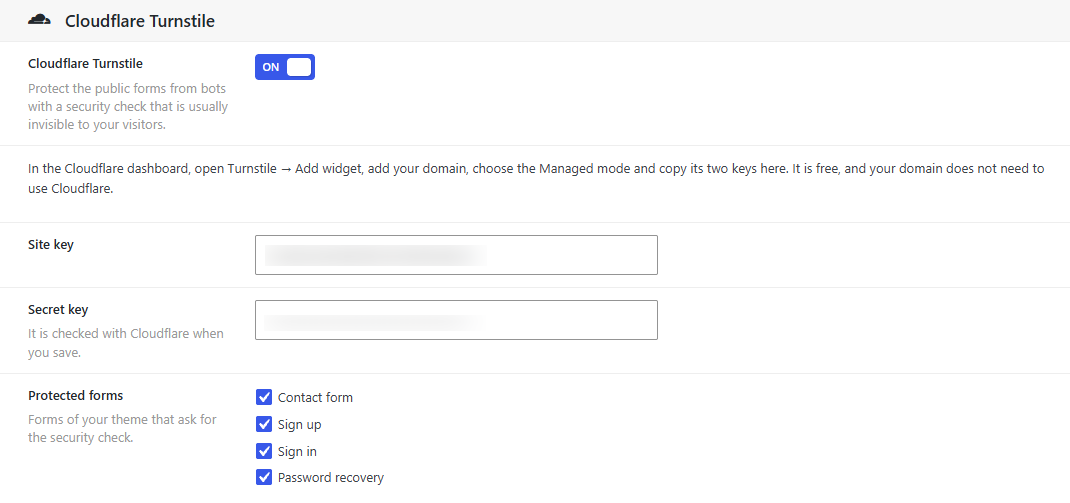
Protected forms
| Form | Where |
|---|---|
| Contact form | The Contact page |
| Sign up | The sign-up form |
| Sign in | The sign-in form with email and password |
| Password recovery | The form that sends the code to reset a password |
Continue with Google does not need the check: Google verifies those visitors on its side. See Sign in with Google.
Check that it works
- Open your sign-in page in a private window. The Turnstile box appears above the button and shows Success.
- Sign in. If it works, so do the other forms.
If Cloudflare does not respond
If your server cannot reach Cloudflare when a form is sent, the form goes through. An outage of Cloudflare must not lock your members out. The other defenses of your forms stay on: the limits of attempts and the IP blacklist of the Firewall.
Test on a staging or local site
Turnstile only loads on the hostnames of your widget. For a staging or local site, either:
- add its domain to the Hostnames of your widget, such as
staging.your-website.com; or - use the test keys of Cloudflare, which always pass, on that site only:
| Key | Value |
|---|---|
| Site key | 1x00000000000000000000AA |
| Secret key | 1x0000000000000000000000000000000AA |
Never use the test keys on your live site: they do not stop anyone.
Privacy
The check runs in the browser of your visitors, with a script from Cloudflare (challenges.cloudflare.com). Cloudflare processes some data of the visitor to tell people from bots. Mention it in your privacy policy.
Troubleshooting
| Problem | What to do |
|---|---|
| Cloudflare rejected this Secret key. Copy it again from your Turnstile widget., when you save | The Secret Key is wrong. Copy it again from Cloudflare, without spaces |
| The security check could not load (error 110200). | Your domain is not in the Hostnames of the widget. Add it in Cloudflare. Use exactly the domain of your site, with www if your site uses it |
| The security check could not load (error 110100) or (error 110110) | The Site key is wrong. Copy it again |
| The security check could not load, with another code | Reload the page. If it keeps happening, look up the code in the Turnstile documentation of Cloudflare |
| Wait for the security check to finish, then try again. | The visitor sent the form before the box showed Success, or an extension blocked the script of Cloudflare |
| The security check failed. Please try again. | The check expired, was already used, or failed. The form gets a new one: the visitor tries again |
| The box does not appear at all | Check that the switch is on, that both keys are saved and that the form is checked in Protected forms. If you use a page cache, clear it |