Dbmovies
TVShows
TV Shows is the content type for the series on your site. This page explains how a series, its seasons and its episodes fit together, how episodes are imported, and what each part of the editor and the list does.
Overview
A TV show is the main record of a series. Unlike a movie, it is not a single piece of content: it sits at the top of a structure with its seasons and its episodes.
- The TV show is the parent record. It holds the general information: name, poster, synopsis, cast, images, status and the list of its seasons.
- The seasons are stored inside the TV show. They are not separate content.
- The episodes are separate content, and each one is linked to its TV show.
You can create TV shows in two ways:
- By importing them from TMDb. This fills in the general information and the list of seasons. Use the importer in the Dbmovies menu (the Shows tab), or Quick import from the TV shows list. See Importers.
- By hand, with the add button at the top of the TV Shows list.
You find TV Shows in your admin sidebar. The episodes list, TV Episodes, is in the same menu.
The TV shows list
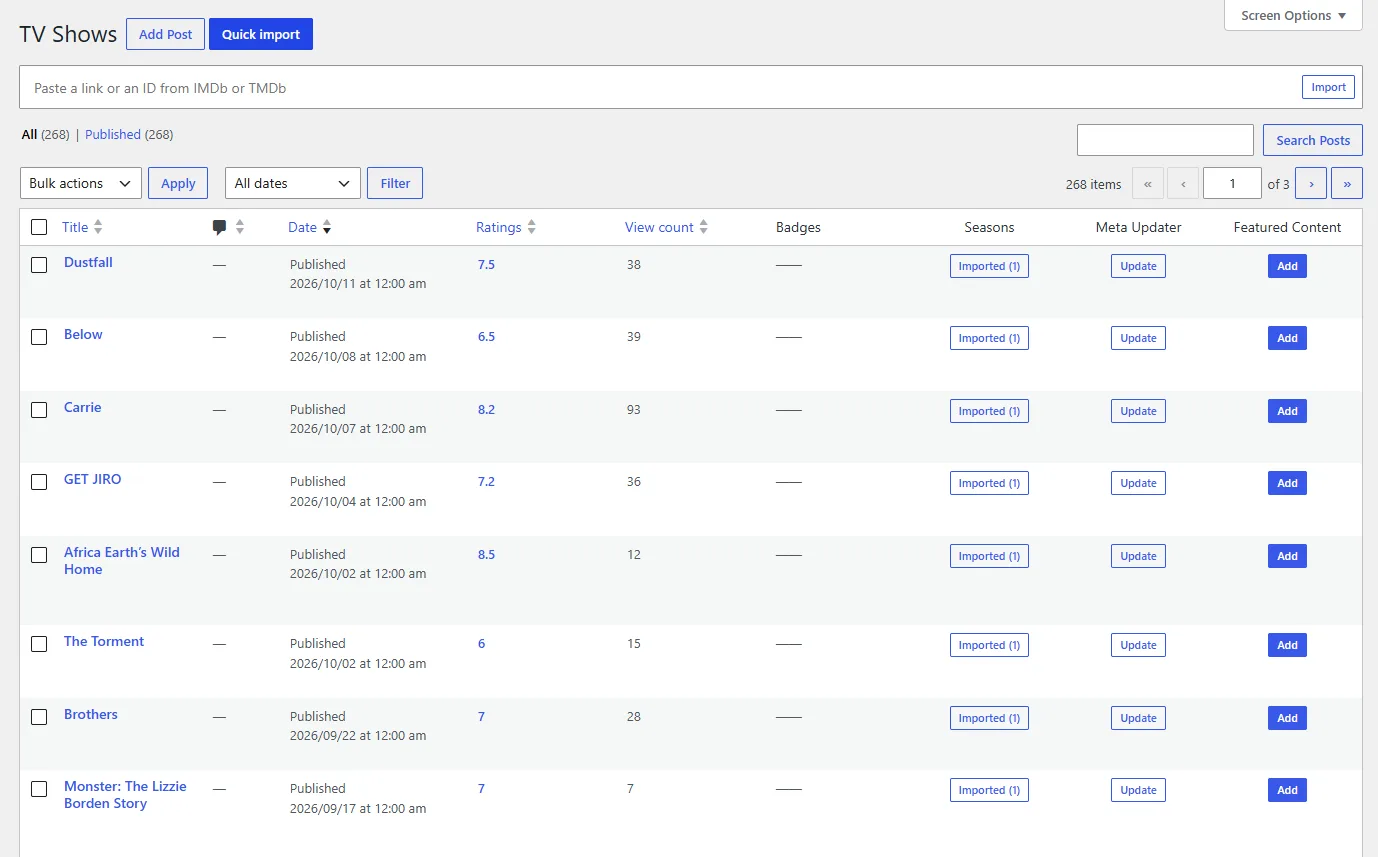
Besides the title and the date, the list has its own columns:
| Column | What it shows |
|---|---|
| Ratings | The rating of your visitors and its number of votes |
| View count | How many times the TV show was viewed |
| Badges | The quality and language badges |
| Seasons | The episodes of the TV show: a button to import them, and their state in the Automatic episodes queue |
| Meta Updater | An Update button that refreshes the TV show from TMDb and IMDb right away |
| Featured Content | Add or Remove the TV show from your featured content |
Quick import, next to the add button at the top of the list, opens a field where you paste a TMDb or IMDb link or ID, for example https://www.themoviedb.org/tv/1399 or tt0944947. Dbmovies imports the TV show and opens it in the editor.
Quick Edit
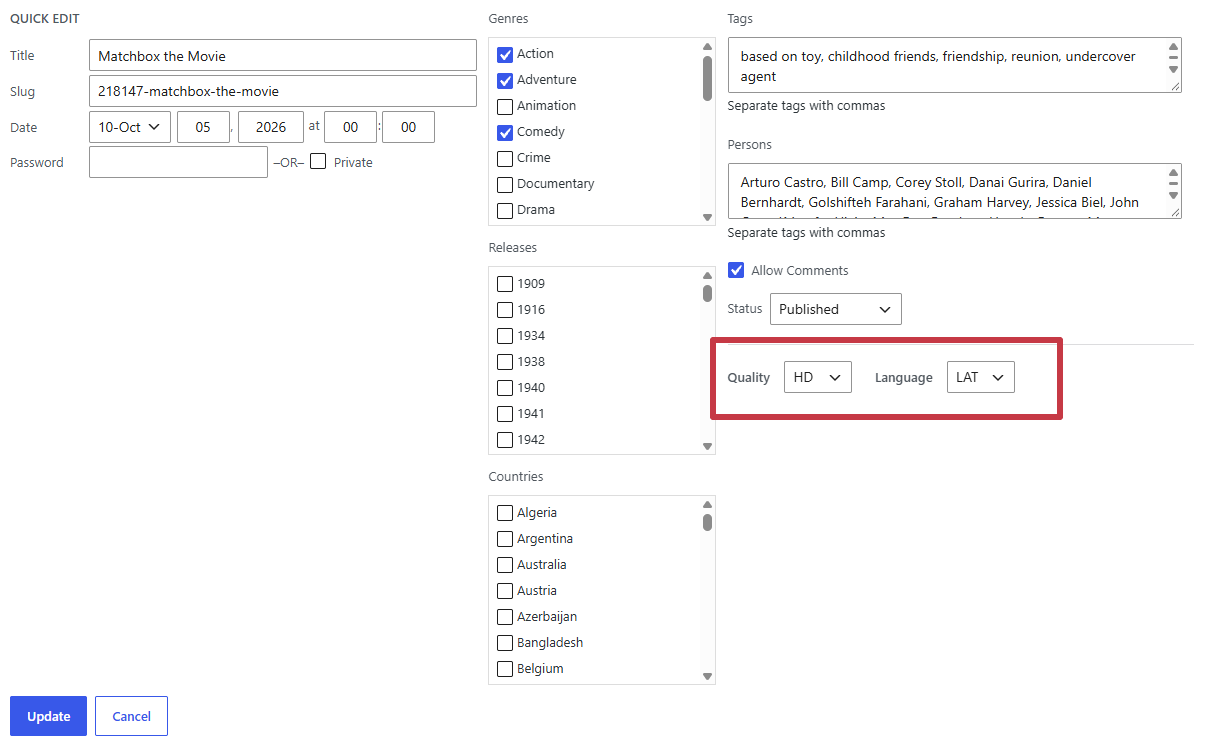
Hover a TV show in the list and click Quick Edit to change it without opening the editor. Besides the WordPress fields, such as the title, the slug, the date and the status, you can change:
- its badges, in Quality and Language, which open with its current badges. The options come from your lists in Custom badges;
- its Genres, Releases and Countries, and its Tags.
The cast and crew are not in Quick Edit: edit them in the Persons field of the editor, so the credits and the person pages stay in sync.
To add genres, release years, countries or tags to several TV shows at once, select them and choose Edit in Bulk actions. Badges are changed one TV show at a time.
The Seasons column
The button of the Seasons column says Import while the TV show has no imported seasons, and Imported (N) once N seasons were imported. Click it to open the seasons manager (see Import episodes by hand).
Below the button, a line shows the state of the TV show in the Automatic episodes queue:
- Episodes queued: it is waiting for its turn.
- Importing episodes · S2: its episodes are being created, here season 2.
- Episodes failed: something went wrong. Hover over it to see the error.
- Skipped · 240 episodes: it has more episodes than the limit you set, so the queue left it out. You can still import its episodes with the button.
When the queue finishes a TV show, the line disappears.
Permalinks
Every TV show and every episode has its own address. You choose the words in Settings › Permalinks, in the Dbmovies: Post Type section:
- Type: TVShows, by default
tvshows. - Type: Episodes, by default
episodes.
With the default values, the addresses look like this:
https://your-website.com/tvshows/ahsoka/
https://your-website.com/episodes/ahsoka-season-1-episode-1/
The episode name in the address follows the title pattern of your import settings. See Titles and content.
Dbmovies also adds addresses for a season or an episode inside the TV show. Your theme can use them to open the TV show at that season or episode:
https://your-website.com/tvshows/ahsoka/season1/
https://your-website.com/tvshows/ahsoka/season1/episode1/
If you leave a field empty, Dbmovies uses the default. Dbmovies refreshes your site addresses on its own when you save.
Changing a word changes the address of every TV show or episode you already published. Choose them before you open your site.
Editing a TV show
The TV show editor has the standard WordPress fields and two Dbmovies boxes: Metadata and Advanced. TV shows have no Sources box: the links go in each episode.
Standard WordPress fields
- Title: the name of the series on your site.
- Editor: the synopsis or description.
- Featured image: the poster.
- Comments: comments are always open on movies. Dbmovies keeps them open even if you uncheck Allow comments here or in Settings › Discussion. The rest of the discussion settings still apply, such as comment moderation.
- Author: the user who published it. Episodes created by the Automatic episodes queue take the same author.
Classifications
TV shows use the same classifications as movies, so your catalog stays consistent: Genres, Releases (the first air year), Countries, Persons (creators and cast) and Tags.
Metadata
The Metadata box holds the details of the series, in tabs:
- Main data: Status, series name, original name, tagline, poster path, first and last air dates, runtime, and the number of seasons and episodes.
- Identifiers: the TMDb ID, the IMDb ID and the YouTube ID of the trailer.
- External Metric: the age rating (Rated, for example TV-14 or TV-MA), and the rating and votes of TMDb and IMDb.
- Persons: the creators and the cast, with the character each actor plays. When you import a TV show, the cast is the main cast of all its seasons, ordered by the number of episodes each actor appears in.
- Images: the main logo and backdrop, plus more logos and backdrops.
- Seasons: the list of seasons, explained below.
The Status can be Returning Series, Planned, In Production, Ended, Canceled, Pilot or Unknown status, so your site can show whether a series is still on the air.
Advanced
The Advanced box works as in movies: badges, featured content, adult content, collections and platforms. On a TV show, the Auto-Embed switch leaves out the TV show and all its episodes.
How seasons and episodes fit together
A series has three levels: the TV show, its seasons and its episodes.
Seasons live inside the TV show
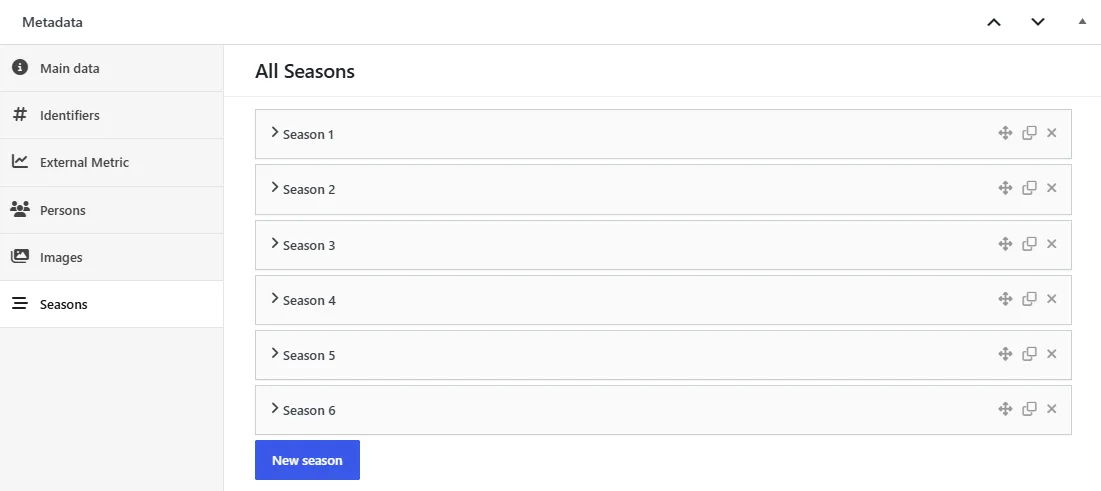
The seasons are part of the TV show record. In the Seasons tab of the Metadata box, each season has:
- Season Name
- Poster Path
- Overview: a short summary of the season.
- Season Number: it sets the order of the seasons.
- Episodes count: how many episodes the season has.
- Air Date: when the season started.
When you import a TV show from TMDb, this list is filled in for you. To add a season by hand, click New season below the list.
Episodes are linked to the TV show
Episodes are separate content. In the Main data tab of an episode:
- TV Show: the series the episode belongs to. Start typing its name and choose it from the list.
- Season Number and Episode Number: its place in the series.
With these three fields, the episode is connected and ordered inside its TV show. Each episode also has a TMDb ID, a quality badge, its name, air date, runtime, images and links. See Episodes.
Importing the episodes
You can bring in the episodes of a TV show in two ways.
Automatic episodes
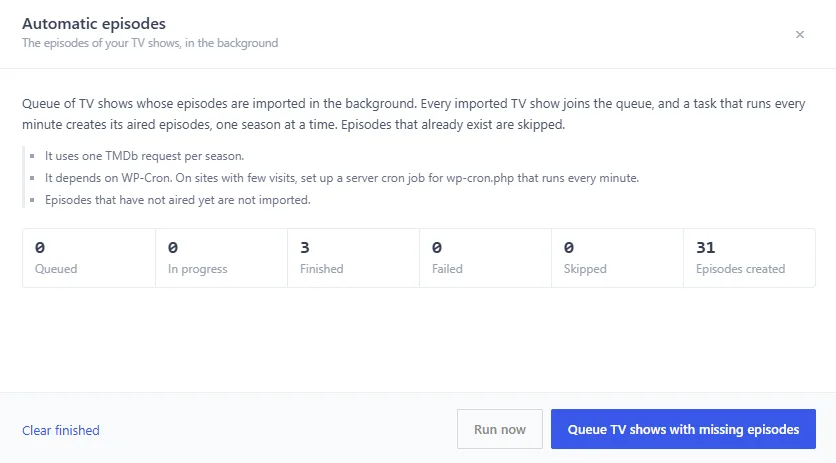
With Automatic episodes on, every TV show you import joins a queue, and its aired episodes are created in the background, one season at a time. You do not need to open anything: you import the TV show and the episodes arrive on their own.
- Turn it on in Dbmovies › Settings › Data Importer › Automatic episodes. There you also choose the season order, the latest seasons only, and a limit of episodes per TV show.
- Follow it in the importer: open the menu next to Meta updater and choose Automatic episodes. The panel shows the TV shows in the queue, the season in progress and how many episodes were created, and refreshes on its own.
- Add your existing TV shows to the queue with Queue TV shows with missing episodes, in the same panel.
The queue only creates episodes. Episodes that already exist are skipped and not changed, and episodes that have not aired yet are not created. It uses one TMDb request per season, and it needs your scheduled tasks to run: see Cron Jobs.
Import episodes by hand
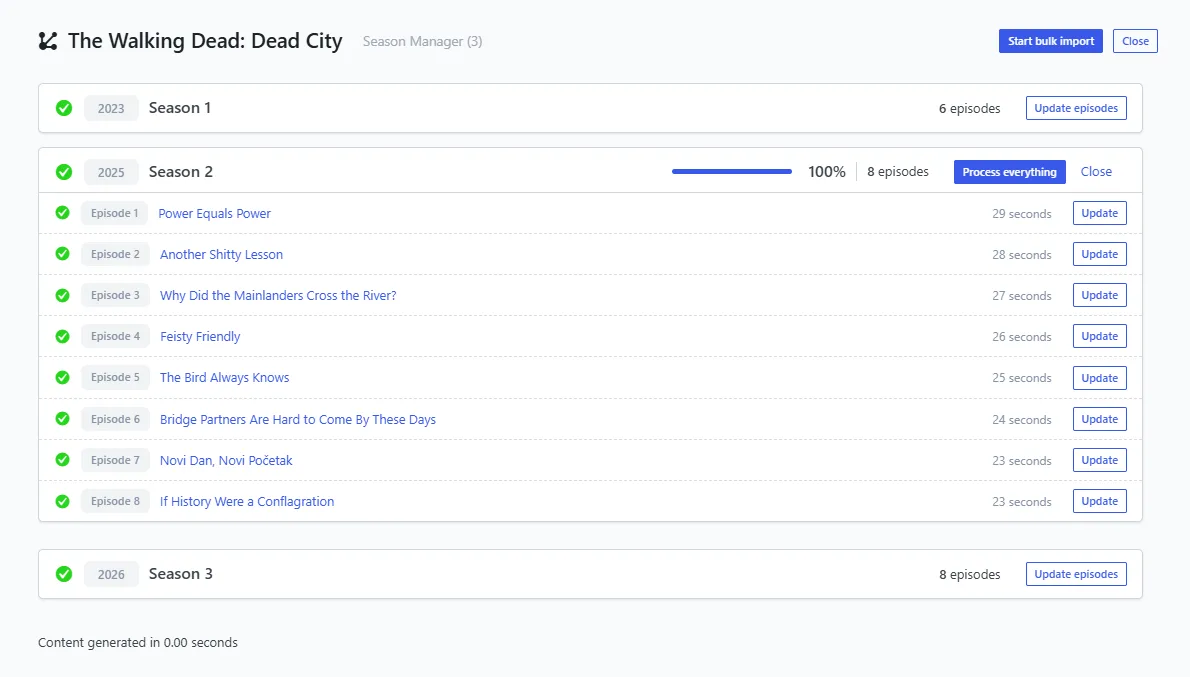
Click the button of the Seasons column in the TV shows list to open the seasons manager. It lists the seasons of the TV show from TMDb:
- Import the episodes of one season at a time.
- Or click Start bulk import to import every season in a row.
Here, an episode that already exists is updated with the data from TMDb instead of being created again.
What Dbmovies does with each episode
Either way, Dbmovies:
- links every episode to its TV show;
- sets its season and episode numbers;
- builds its title and address from the pattern in your Titles and content settings, so all your episodes follow the same style;
- never creates the same episode twice.
Keeping a TV show up to date
- One TV show: click Update in the Meta Updater column of the list.
- Your whole catalog: turn on the automatic Meta Updater.
- New episodes of a series on the air: add it to the Automatic episodes queue again with Queue TV shows with missing episodes, or import its latest season from the seasons manager.