Dbmovies
License activation
How to activate your Dbmovies license, what it unlocks, how the daily request limit works, and how to move, renew or remove a license.
What the license unlocks
Your Dbmovies license is the only credential the plugin needs from Doothemes. While it is active, it gives you:
- The importers: importing movies and TV shows, Quick import and title requests.
- The background tasks: Automatic episodes and the Meta Updater.
- IMDb data for your movies and TV shows, and the optional TMDb proxy.
- Plugin updates, delivered to your WordPress admin for the time your plan includes.
- The plugin settings: changes to the settings are saved only with an active license.
If your license expires or is removed, your site keeps working and everything you imported stays published. The features above stop until you activate a license again.
Where to find your license key
You receive your license key by email after your purchase. You can also see all your licenses at any time in Licenses in your Doothemes account.
How to activate your license
- In your WordPress admin, go to Dbmovies › Updates. You see one row for each Doothemes product on your site: Dbmovies and your Doothemes themes, such as Wovie.
- Click the Dbmovies row, or Activate on that row. The License management panel opens.
- Paste your key in License key.
- Click Activate.
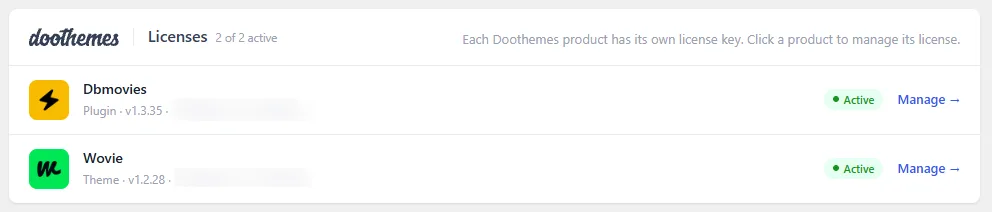
When the activation works, the panel shows a confirmation and the row changes to Active, with your key partly hidden.
Use the license of the right product. A Wovie license does not activate Dbmovies, and the panel tells you if the key belongs to a different product.
What the panel shows
With an active license, click its row to see:
- Usage: the requests used today out of your daily limit.
- License period: how much of your license period has passed and when it expires.
- Sites: how many sites use this license out of the number your plan allows.
- Manage plan: links to renew the license or move to a higher plan from your Doothemes account.
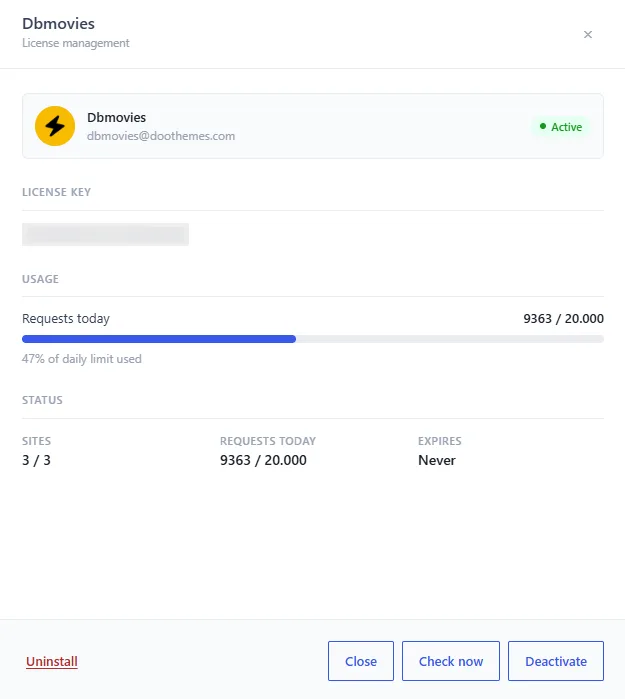
The daily request limit
Every license includes a number of requests per day to the Doothemes server. These count toward the limit:
- IMDb data: one request for each movie or TV show you import or update. Episodes do not use IMDb requests.
- The TMDb proxy, if you turn it on.
- License checks.
Requests to TMDb with your own API key do not count. The importer shows how many requests you used today, next to your limit.
When you reach the limit, the features that use the Doothemes server stop making requests until the next day. Nothing breaks, and the data you already have stays in place. If you have more than one active license on your site, for example a Dbmovies license and a Wovie license, IMDb data continues with the next one.
You can see the limit of each license type on the Dbmovies page, and move to a higher plan at any time from your account.
Check your activation
After you activate your license, check that:
- The Dbmovies row shows Active in Dbmovies › Updates.
- The importer finds titles when you search.
- Plugin updates appear in Dashboard › Updates when a new version is out.
Dbmovies checks your license with the server every hour, so a renewal or a change of plan shows up on its own. To check it right away, open the license panel and click Check now. You can change how often it checks in Dbmovies › Tools › Cron jobs.
Move your license to another site
Each license works on the number of sites its plan allows at the same time. Local sites (localhost, and domains ending in .local, .test or .localhost) do not use an activation. To use it on a different site or domain:
- On the old site, open the license panel in Dbmovies › Updates and click Deactivate. This frees the site on the server.
- Activate the license on the new site.
If you move the site to a new domain without deactivating it first, the old domain keeps using one activation. If you can no longer reach the old site, open a support ticket to free it.
Deactivate or uninstall a license
The license panel has two ways to remove a license from your site:
- Deactivate frees this site on the Doothemes server, so you can use the license somewhere else. It needs the server to answer.
- Uninstall removes the license from this site even if the server does not answer, or if the license is no longer valid. It also tries to free the site on the server. Use it when Deactivate fails, or to clean up an expired or disabled license.
Both keep your settings and your content. You can activate a license again at any time.
Activation problems
The panel tells you why an activation failed:
- "The license key is invalid." Check that you copied the whole key, without spaces before or after it.
- "This license reached its activation limit. Deactivate it on another site first." The license is already active on as many sites as your plan allows. Deactivate it on a site you no longer use, or move to a higher plan. If you can no longer reach that site, open a support ticket to free it.
- "This license has expired." Renew it from your Doothemes account.
- "This license has been disabled." Contact support.
- "This license belongs to a different product." Use the license of the product you are activating.
- "Could not reach the licensing server." Your server could not connect to the Doothemes server. Check that it can make outgoing HTTPS connections to
edge.wupdater.com(see Requirements), and that no firewall or security plugin blocks them. - "The license could not be verified on this site. Please reactivate." Uninstall the license and activate it again.
If the problem continues, open a support ticket with your license key and the exact message you see.
Next step
With your license active, configure the plugin and add your TMDb API key: continue with Initial settings.